Your Instagram DMs can become a useful collection of workout ideas, but a collection is not a session. To use one at the gym, you still need to decide which exercises to do, understand the instructions and know what counts as finished. Start with one saved post rather than trying to organise your entire inbox.
1. Choose a workout you can realistically use
Open the original post and check the caption, equipment and explanation. Prefer something appropriate to your experience and available equipment. If the movement is unfamiliar, ask a qualified trainer rather than guessing from a still image. Keep the original link so you can return to the creator's instructions.
2. Capture the useful information
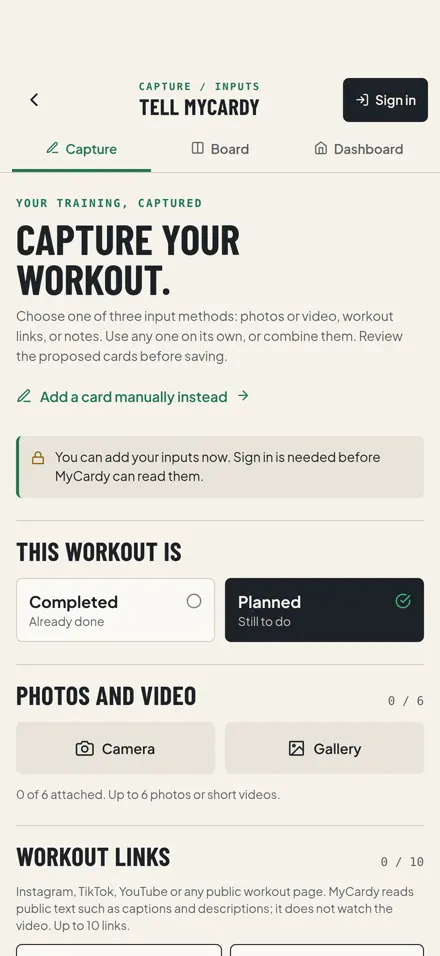
Take clear screenshots of the exercise and its written instructions. A collage can contain several movements; include closer views if individual panels are small. Capture the caption too when it contains sets, reps or rest. In MyCardy, open Capture, choose Planned and add your screenshots. You can also type the instructions in Notes.
You can also submit a public workout link. MyCardy attempts to retrieve accessible video and audio for analysis, and may use public page text as a fallback. Social platforms can block automated retrieval or ask the server to verify access, so a public link is not guaranteed to work. MyCardy does not sign in to Instagram or read your private DMs. If retrieval fails, use screenshots, upload a clip or paste the workout details.
3. Review separate exercise cards
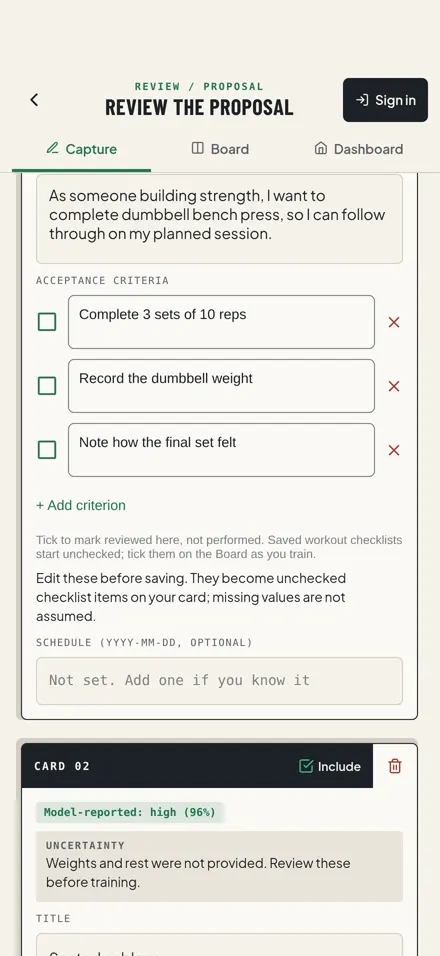
MyCardy proposes separate cards for distinct exercises it can identify; a collage containing several movements may need clear, close-up screenshots so each exercise can be distinguished. Different poses of one movement should not automatically become extra exercises. Check the proposed card count and every exercise name. A draft may need your confirmation when the movement is unclear; remove an incorrect draft and check the source before training.
Each card has an editable description and acceptance-criteria checklist. Keep instructions supported by the source, and add your own choices explicitly. If no weight or rest interval is given, review it yourself rather than treating a missing value as a prescription. The checklist in the example screenshots is illustrative, not a beginner programme.
4. Make a session, not another saved collection
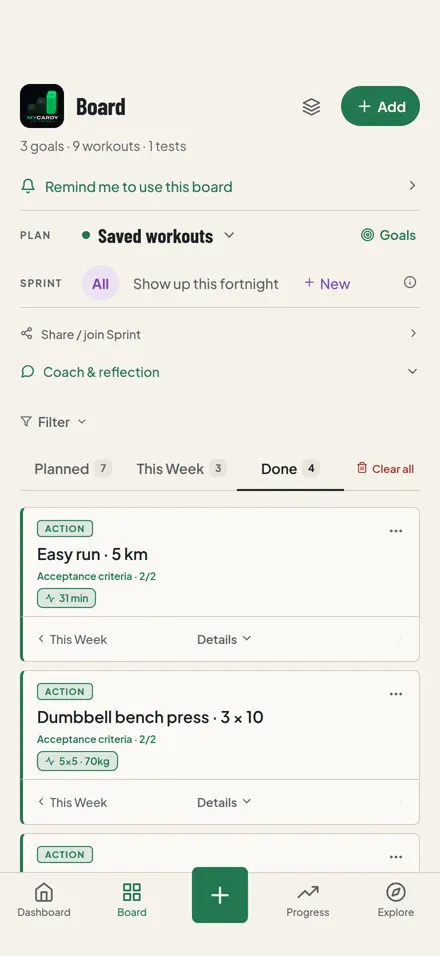
Save the reviewed cards to a suitable board or Plan. Choose the cards you intend to do and move them into This Week. Set a board reminder for a date and time before you plan to train. Reminders are device-local and depend on notification permissions; they are not a guarantee that you will receive an alert.
5. Track what you actually finish
Tick a card's checklist as you work through the session, then move it to Done when it reflects what you completed. Capturing someone else's workout is not evidence that you performed it. Review what is left before adding another ten ideas.
Does this work for TikTok and YouTube?
The same approach applies to TikTok, YouTube and other platforms. A public link may allow MyCardy to analyse video frames and spoken audio, but access varies by platform and post; a link alone is not a promise of a successful import. Keep the source for reference, review all proposed cards and respect the creator's rights. Do not redistribute their media or sell a copied programme.
If choosing a session is the hard part, read how to stop procrastinating working out. If the gym itself feels unfamiliar, use the first-session guide. You can try a screenshot capture on the homepage or find MyCardy on iPhone.